Motion, directed
from your agent.
With Cavalry.

A Cavalry plugin and a local MCP server. Your agent builds the scene, keys the motion, and sends it to render.

Get Spur for Cavalry Signed and notarized for Apple silicon and Intel Macs.

Features

Agent
Cavalry

A scene you can still edit.

A harness packed with Cavalry practice sits between the agent and the file. The agent goes through it. You inherit a scene, not a dump.

  • Named sections

    Groups by role. Controllers named for the next artist.

  • Duplicators, not copies

    Repeats stay procedural. Per-letter layers when each one needs its own motion.

  • Magic Easing by role

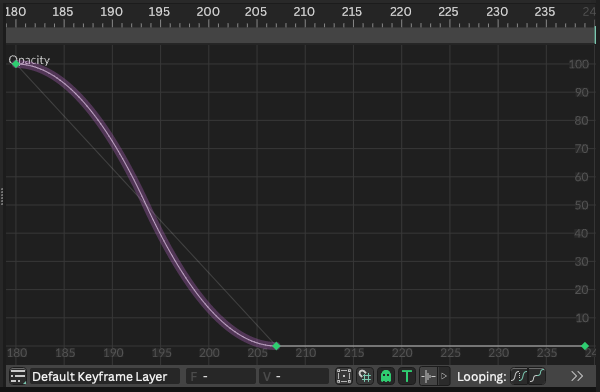
    SlowOut to arrive. SlowIn to leave. SlowInSlowOut to travel.

  • Keys you can grab

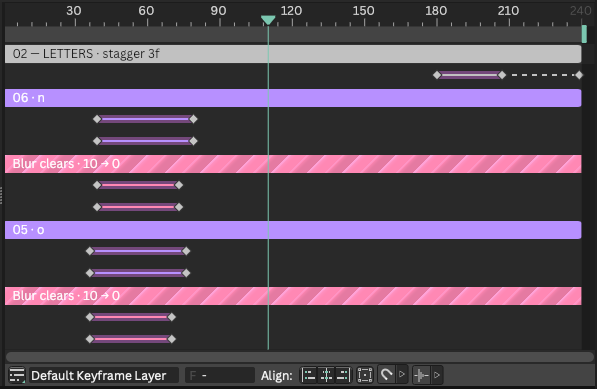
    Named filters, staggered tracks, a hold. Open the file and keep going.
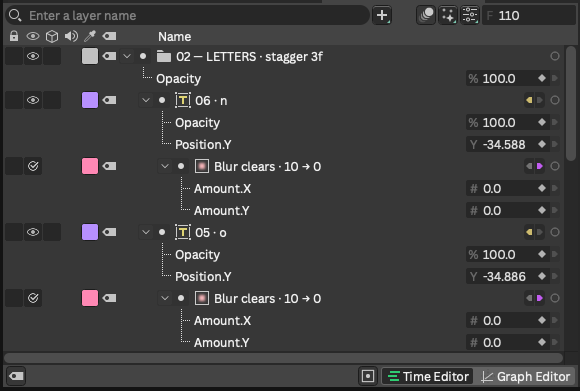
Cavalry Scene Window with numbered letter groups and nested blur filtersCavalry Time Editor with staggered letter and blur tracksCavalry Graph Editor with a SlowOut opacity curve that settles and holds
Cavalry Scene Window, Time Editor, and Graph Editor from a generated scene.

All the tools.

Compositions, type, shaders, masks, cameras, the render queue.

Scene building

Compositions, groups, layers, and clean production structure.

Type & paths

Editable text, fonts, paths, fills, strokes, and alignment.

Motion

Keyframes, Magic Easing by role, timing, and intentional stagger.

Shaders

Materials, gradients, SkSL, filters, and visual effects.

Masks

Build and combine masks without flattening your scene.

Assets

Import, inspect, place, and manage production assets.

Rendering

Configure compositions and send work to the render queue.

Local by default

The plugin stays in Cavalry. The server stays on your Mac. Arbitrary scripts stay blocked.

Cameras

Place cameras, switch views, and frame the shot.

And more

Color, time, utilities, and scene queries.

Pricing

$12USD · once
  • Cavalry plugin + local MCP server
  • 78 focused Cavalry tools
  • License for two Macs
  • Built-in animation harness for polished motion
Continue to checkout

FAQ